How to Fix Dash Cam Memory Card Errors Quickly

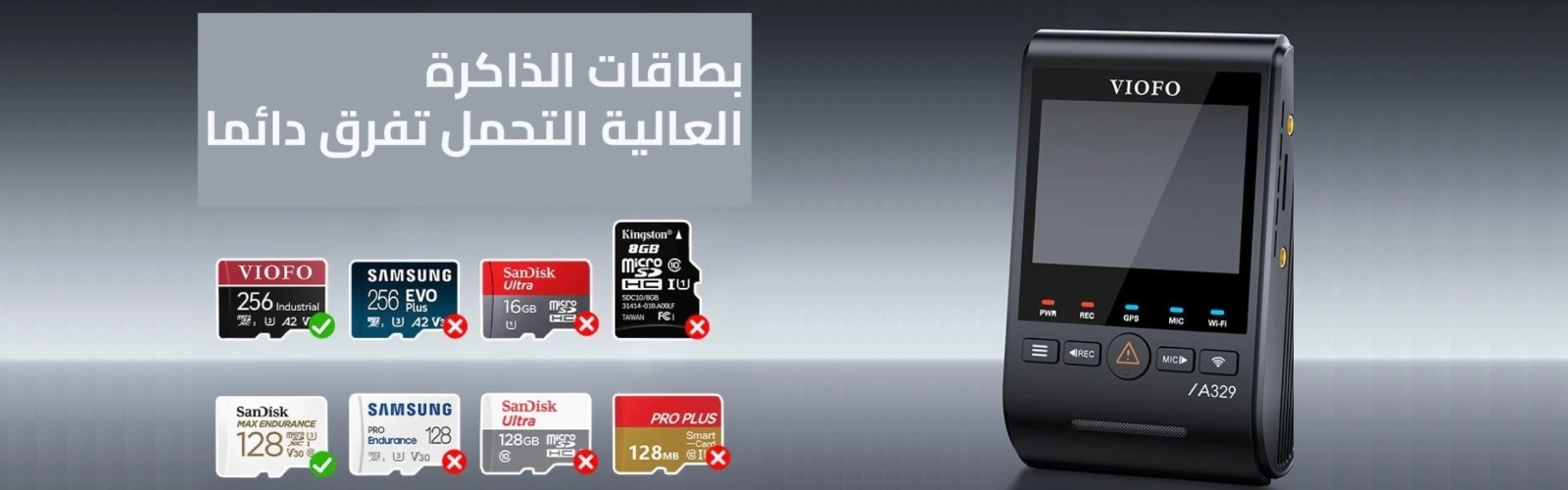
See the Problematic Cards Returned by Customers

High-Endurance MicroSD Cards Matter

Best High-Endurance microSD for Dash Cams in Saudi Arabia (KSA) — Fix SD Errors Fast

If your dash cam shows Memory Card Error, Card Slow, freezes on boot, or keeps failing formats, the problem is often not the camera — it’s the microSD card. Dash cams overwrite video 24/7, and in Saudi Arabia, heat and long driving hours make low-grade cards fail faster.

Shop verified dash cam cards: BSTA Memory Cards (Dash Cam Ready)

Why buy from BSTA (vs random marketplace listings)?

  • Dash-cam compatibility focus: cards selected for loop-recording stability (not “general use”).
  • Lower counterfeit risk: marketplaces often mix sellers; counterfeit SD cards are a common cause of failures.
  • KSA-focused support: help with formatting routines, capacity selection, and error diagnosis.

Quick Fix Checklist (Before You Replace the Card)

  1. Backup any important clips.
  2. Format inside the dash cam (not only on PC).
  3. If errors return, test with a known high-endurance card.
  4. For 2K/4K, choose U3/V30 (or higher) endurance cards.
  5. Set a habit: format every 2–4 weeks.

The 6 Most Common microSD Problems (With Video Fixes)

Issue 1: “Memory Card Error”

This warning usually means the dash cam can’t reliably communicate with the card (instability, incompatibility, counterfeit, or worn flash).

Issue 2: “Card Slow”

The card’s sustained write speed is too low for your dash cam’s bitrate. For 2K/4K, use U3/V30 endurance cards.

Issue 3: “Memory Card Full” (Even After Formatting)

Repeated “Card Full” after formatting often points to file system corruption or failing flash memory. If it repeats, replace the card.

Issue 4: Slow Startup

A failing/unstable card can delay boot and delay recording start. Testing with a proven endurance card is the fastest diagnosis.

Issue 5: Frozen Boot Screen

If your dash cam freezes on the logo screen, the card may be incompatible or failing. Remove it, reboot, then test another endurance card.

Issue 6: Memory Card Formatting Failed

If formatting fails in the camera and on a computer, the card is likely permanently corrupted and should be replaced.


What to Buy in Saudi Arabia (Simple, Reliable Spec List)

  • Type: High-Endurance / Max Endurance (built for continuous writing)
  • Speed: U3 / V30 (minimum for 2K/4K dash cams)
  • Capacity: 128GB–256GB for most drivers (more buffer, less wear)
  • Source: trusted seller to avoid counterfeits (major cause of “SD errors”)

Dash Cam Memory Cards (Category)  |  Shop high-endurance options


Formatting Routine (Recommended for KSA Heat + Daily Driving)

  • Format the card inside the dash cam (best compatibility).
  • Format every 2–4 weeks for stable loop recording.
  • If you drive long distances daily or use parking mode often, format closer to every 2 weeks.
  • If you see errors recurring after formatting, replace the card with a high-endurance model.

Stop SD Errors — Upgrade to a High-Endurance Card

If your dash cam shows Memory Card Error, Card Slow, or Formatting Failed, the fastest long-term fix is switching to a proven endurance-rated microSD card.


FAQ: Dash Cam microSD Cards in Saudi Arabia

1) What is the best microSD card for a dash cam in Saudi Arabia?

Choose a high-endurance microSD with U3/V30 (or higher) for continuous 2K/4K recording and KSA heat.

2) Do I really need a high-endurance card?

Yes. Dash cams overwrite video nonstop. Endurance cards are built for that workload and fail less often.

3) What does “Memory Card Error” mean?

Usually the card is incompatible, unstable, counterfeit, corrupted, or worn out. Format in-camera and replace if it returns.

4) What does “Card Slow” mean?

The card can’t keep up with the camera’s bitrate. Use U3/V30 endurance cards for 2K/4K.

5) Why does it say “Card Full” even after formatting?

Often file system corruption or failing flash memory. If it repeats, replace the card.

6) What capacity should I buy (128GB vs 256GB)?

128GB–256GB is ideal for most drivers. Higher capacity can reduce rewrite stress and keep more footage.

7) How often should I format my dash cam microSD?

Every 2–4 weeks inside the dash cam. More frequently if you drive daily or use parking mode.

8) Does Saudi heat damage microSD cards?

Heat can accelerate wear and increase errors on low-grade cards. Endurance cards are better for harsh conditions.

9) Can a microSD card cause slow startup?

Yes. A failing card can delay boot while the dash cam tries to read it.

10) Can a microSD card cause frozen boot screen?

Yes. Incompatible/failing cards can freeze the camera on the logo screen.

11) What should I do if formatting fails?

If formatting fails in-camera and on PC, the card is likely bad. Replace it.

12) Is U1 enough for dash cams?

For many modern dash cams, especially 2K/4K or multi-channel, U3/V30 is safer for stable recording.

13) Do I need V30 for 4K dash cams?

Yes. V30 (or higher) is recommended for stable sustained writing at higher bitrates.

14) Why do some cards work for a week then fail?

Counterfeit or low-endurance cards may appear fine initially, then fail under continuous rewriting.

15) Can I use the same card from my phone/camera?

It may work short term, but phone/photo cards aren’t designed for continuous loop recording. Endurance cards are better.

16) What are the signs I should replace the card?

Recurring errors (Memory Card Error / Card Slow), corrupted clips, failed formatting, slow boot, or repeated “Card Full”.

17) Do multi-channel dash cams need better cards?

Yes. Dual/triple-channel recording increases bitrate and stress. Use endurance + U3/V30 (or better).

18) Where can I buy dash-cam-ready memory cards in Saudi Arabia?

Use a trusted seller with dash cam compatibility focus: BSTA Memory Cards

To the main pageNext article
Comments

No posts found

Write a review
Related Articles
If your #1 goal is clear license plate recording in real Saudi driving conditions (day + night, city + highway), the best results come from the...
A dashcam that only records to a memory card is no longer enough. Drivers in Saudi Arabia face challenges such as hit-and-runs, parking lot...
Whether you're using a dash cam, drone, or camera, memory cards are essential for storing valuable footage. But not all cards are created equal....
Dash cams are becoming a vital addition for modern drivers. From recording road events to enhancing parked vehicle security, a dash cam can be your...
When choosing a dash cam, the quality of the image sensor is one of the most critical factors that determines real-world performance. While...